
Preview Build Progress
After you click Create Preview, you'll be taken to a Preview status screen that shows the progress of generating the storefront preview.
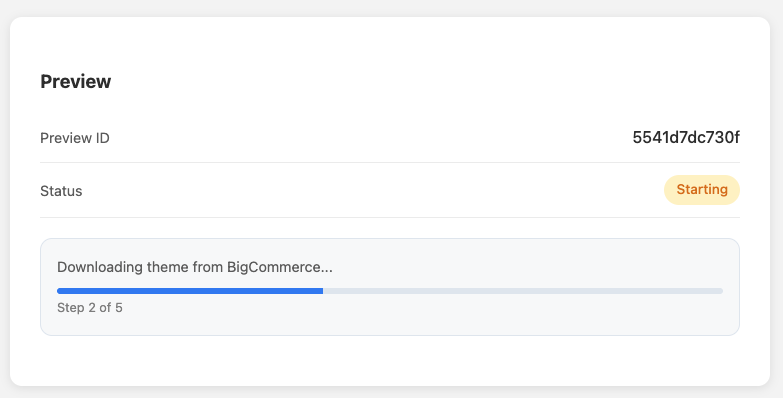
What you see on this screen
- Preview ID: A unique identifier for the preview being generated (example shown:
5541d7dc730f). - Status: The current state of the preview build (example shown: Starting).
- Progress panel: A message describing the current action plus a progress bar and step counter.
-
- Example message: Downloading theme from BigCommerce...
- Example step indicator: Step 2 of 5
How to use this screen
- Wait for the steps to complete. The progress bar and step counter will update automatically.
- Watch the status label for changes (e.g., Starting → Running/Building → Complete, depending on your system wording).
- Once all steps finish, you should be able to proceed to the generated preview (typically the UI will reveal a link/button or redirect—covered when you share that screenshot).
Tips / Notes
- The Downloading theme... step indicates the system is pulling the selected theme assets before assembling the preview.
- If progress appears stuck on a step for a long time, a common first check is refreshing the page or re-creating the preview (your guide can include official troubleshooting once we see the error/timeout states in screenshots).